How to use Vigorbuy: the full beginner order flow
The complete route from a spreadsheet find to a parcel at your door, with the payment split, the QC window and the shipping decision spelled out so nothing stalls.
Last reviewed: 2026-07-26 · figures change; confirm on the official siteThe beginner run is: find on W2CSpreadsheet → paste the link into Vigorbuy → pay the item + service fee → the item reaches the warehouse → check QC photos → consolidate → pay international shipping → track it home.
- You pay in two stages: item + domestic shipping at order, international shipping at the parcel stage.
- The QC-photo window is your chance to catch problems before anything ships.
- Compare the quotes for consolidated and separate parcels before shipping.
- Warehouse-arrival timings and fees are advertised; confirm current values on the official Vigorbuy site.
*Advertised Vigorbuy terms; confirm live values on the official site.
Your haul, in motion
A looping, 20-second walkthrough of the whole journey: the parcel moves through Find → Order → QC → Ship while the route lights up. Prefers-reduced-motion users see a clean static version.
How to buy and ship with Vigorbuy
This illustrated walkthrough follows ten steps from your spreadsheet find to parcel tracking. The official Vigorbuy screenshots show where to act. Check your account for current prices, deadlines and available routes.
Before you start: a 60-second checklist
- A Vigorbuy account with your country set.
- Your body measurements in centimetres written down.
- A rough budget for two payments (item+fee, then shipping).
- The product link (not just a screenshot) for each find.
- A note of anything your country restricts (batteries, liquids).
Buy items on Vigorbuy
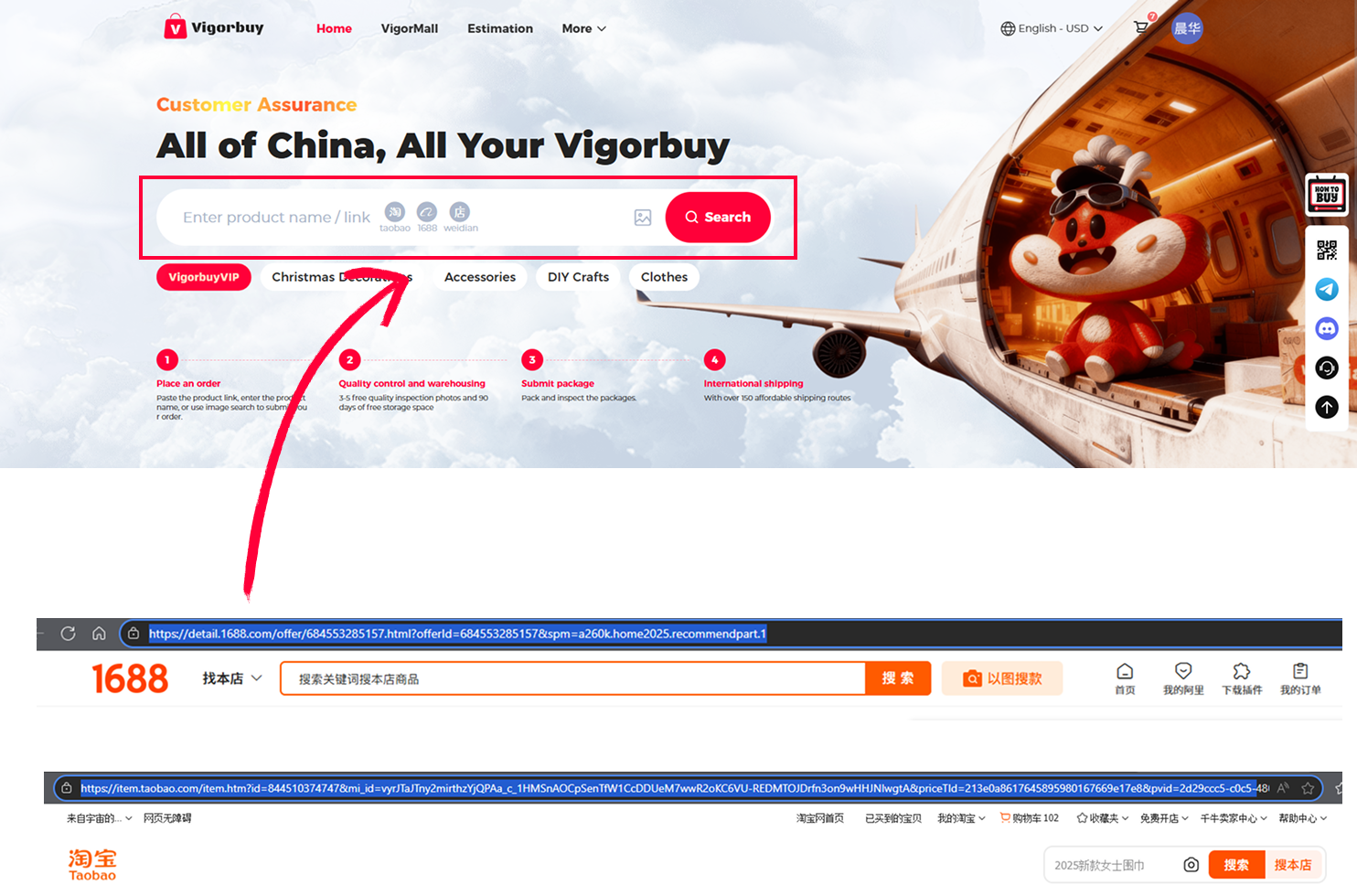
1. Find the product on W2CSpreadsheet
Find the exact item on W2CSpreadsheet and copy its product link. Check the seller, model and colour, and save the size chart for your QC review. Treat the spreadsheet price as an estimate until you see the price on Vigorbuy.
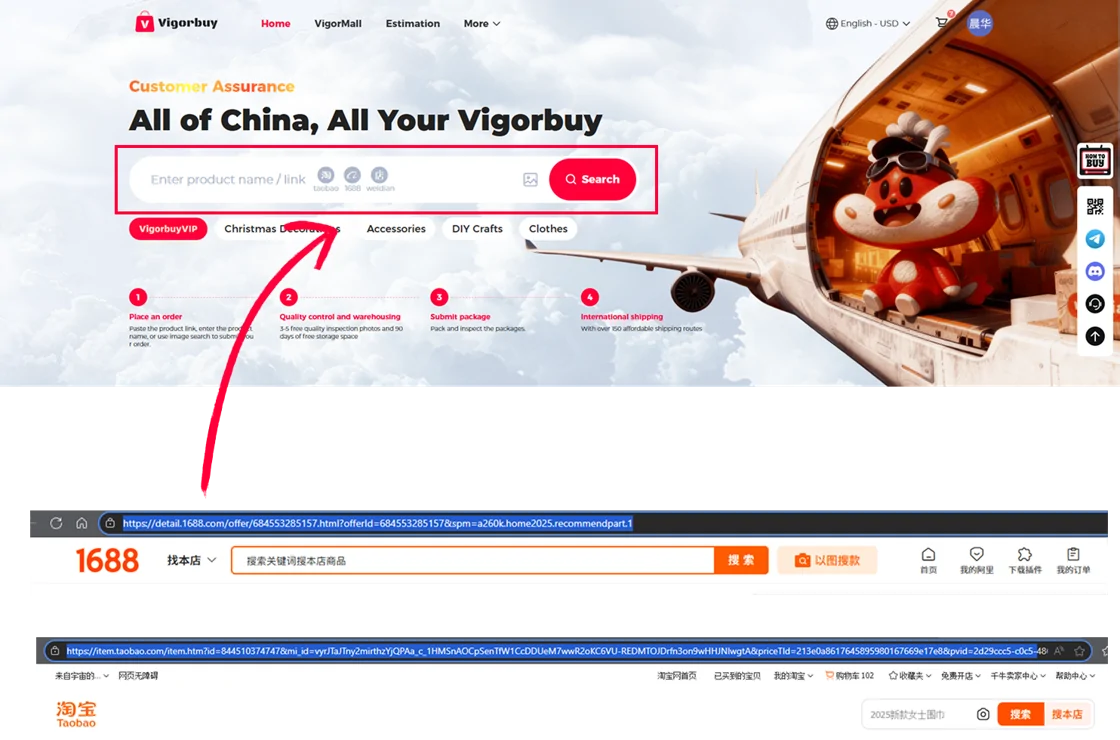
Vigorbuy tutorial screenshot · View original 2. Create a Vigorbuy account
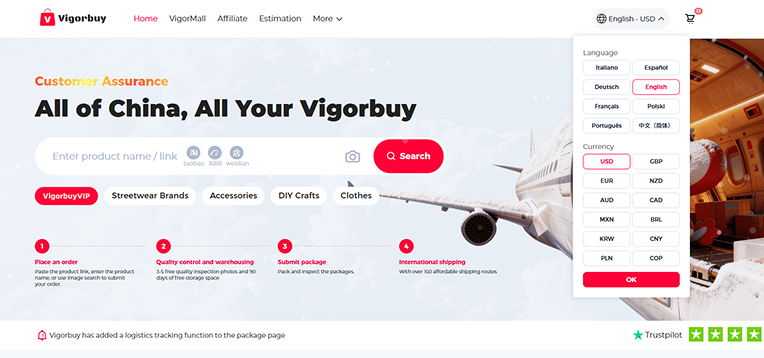
Sign up on the official Vigorbuy site or app and set your destination country so shipping estimates use the right market. Use the language and currency selector to set your preferences before checkout.
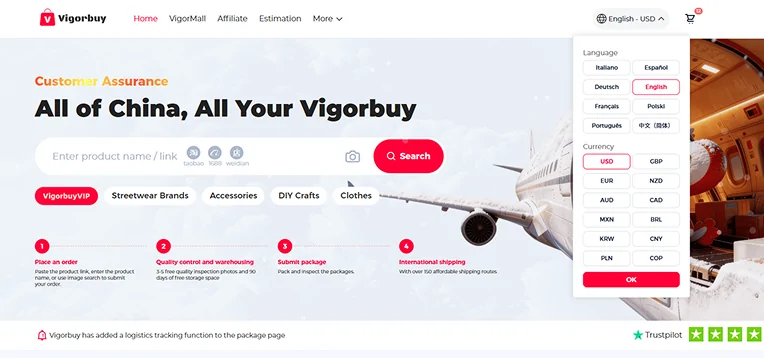
Vigorbuy tutorial screenshot · View original 3. Submit the product link to order
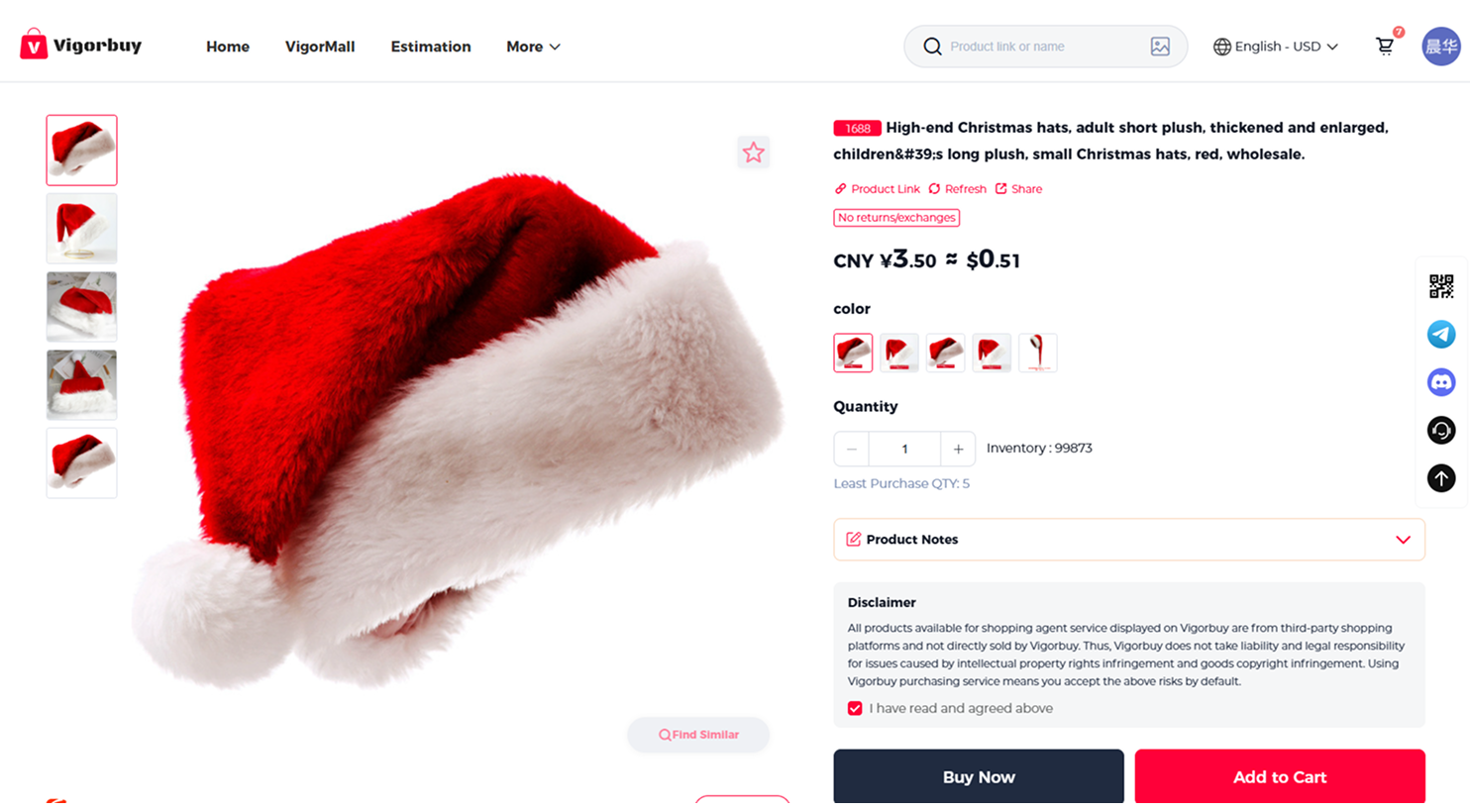
Paste the product link, such as a Taobao or 1688 URL, into Vigorbuy’s search box, or try its image search. On the item page, choose size, colour and quantity. Compare your measurements in centimetres with the size chart, and use the buyer note for special requests before adding to cart or choosing Buy Now.
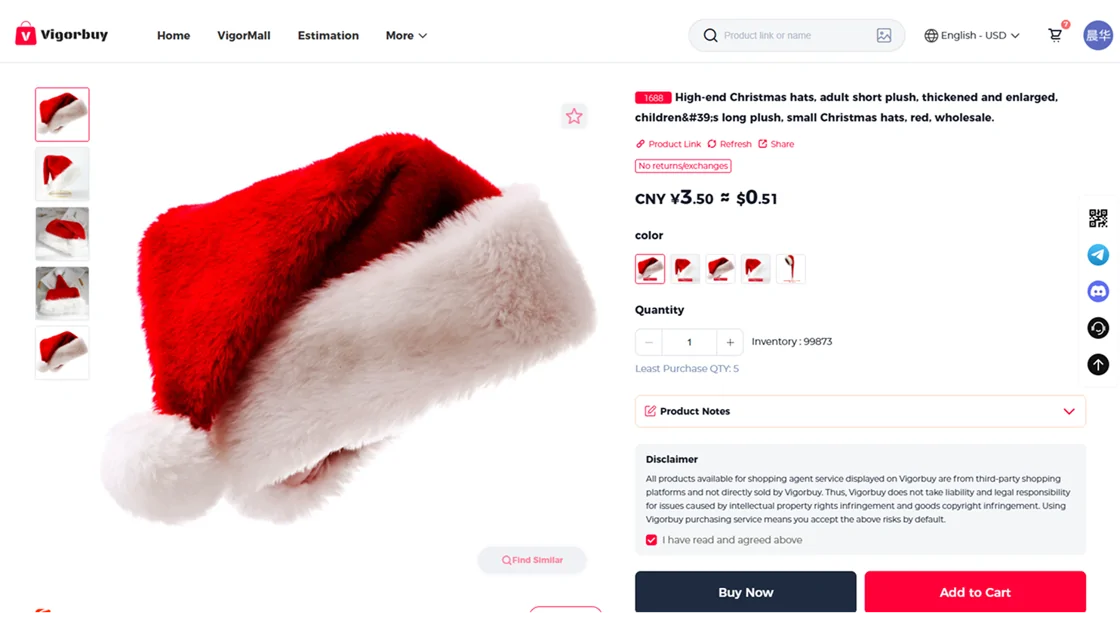
Vigorbuy tutorial screenshot · View original 4. Pay item cost plus service fee
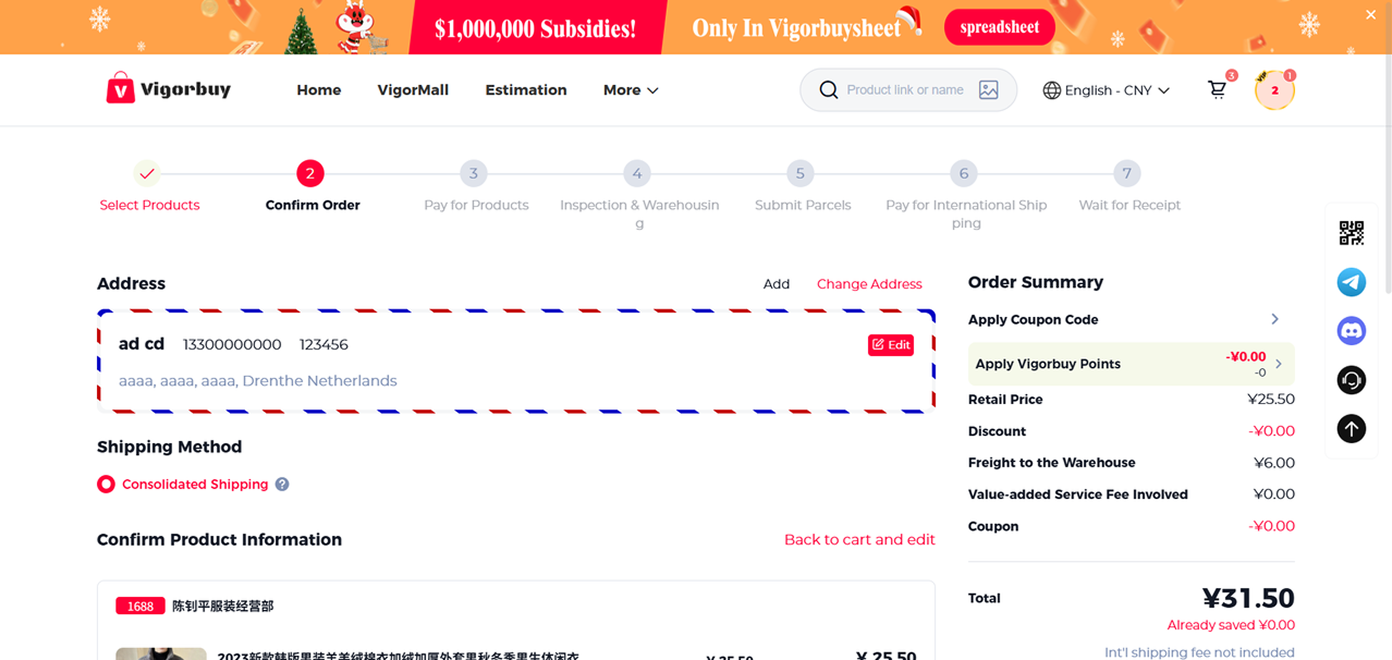
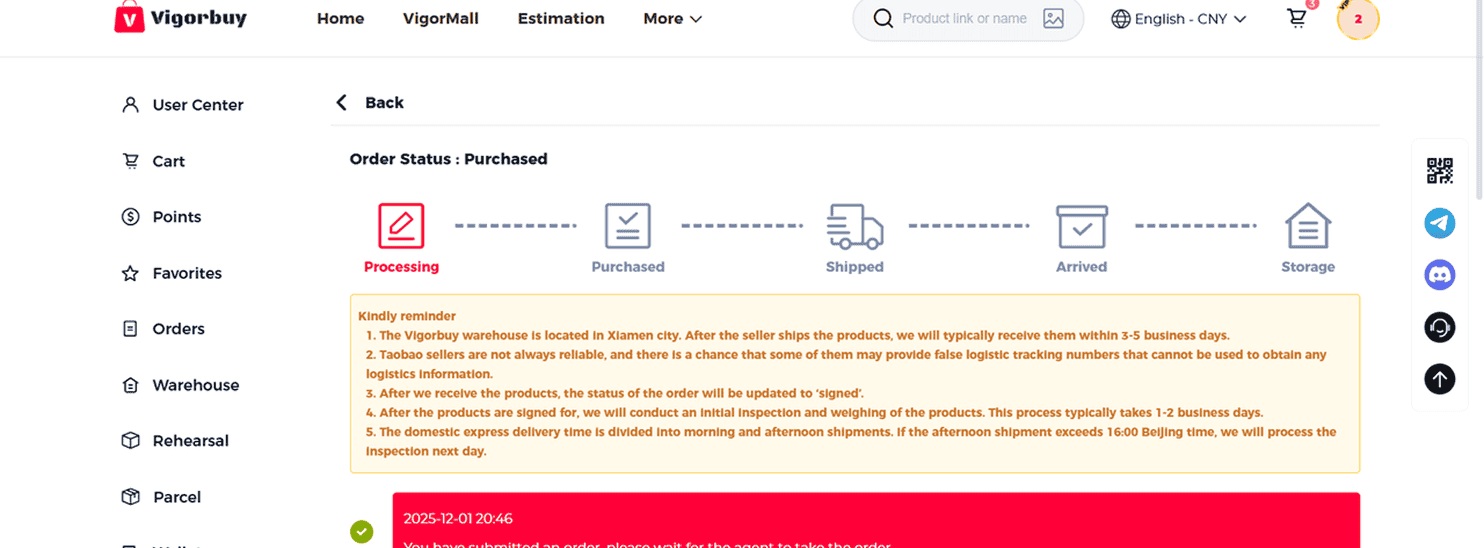
Check the order total and pay for the item, domestic shipping and any applicable service fee. This first payment covers getting the item to the warehouse. Track the paid order in Orders and budget separately for international postage.
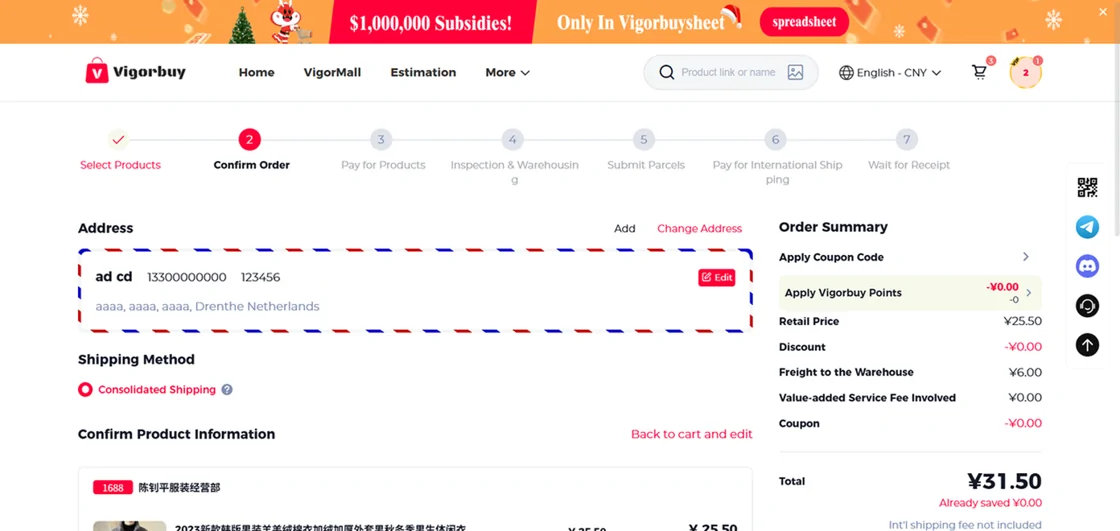
Vigorbuy tutorial screenshot · View original
Purchase, inspect and store
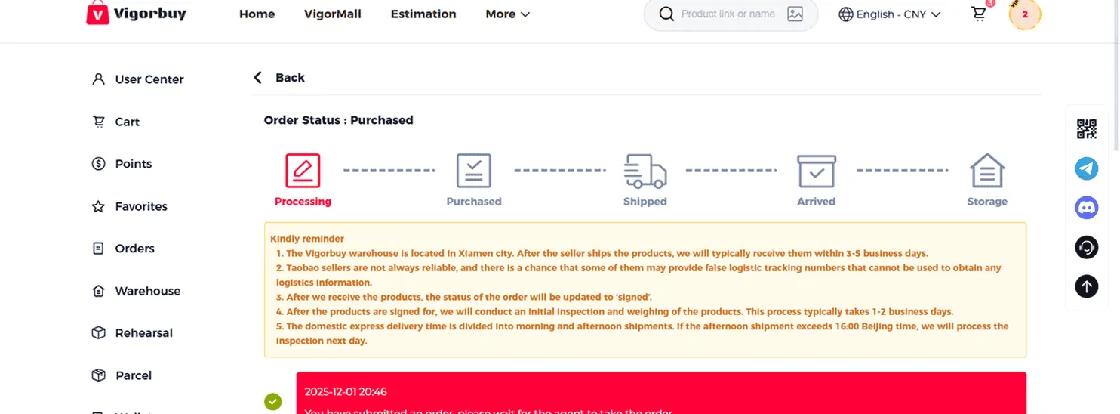
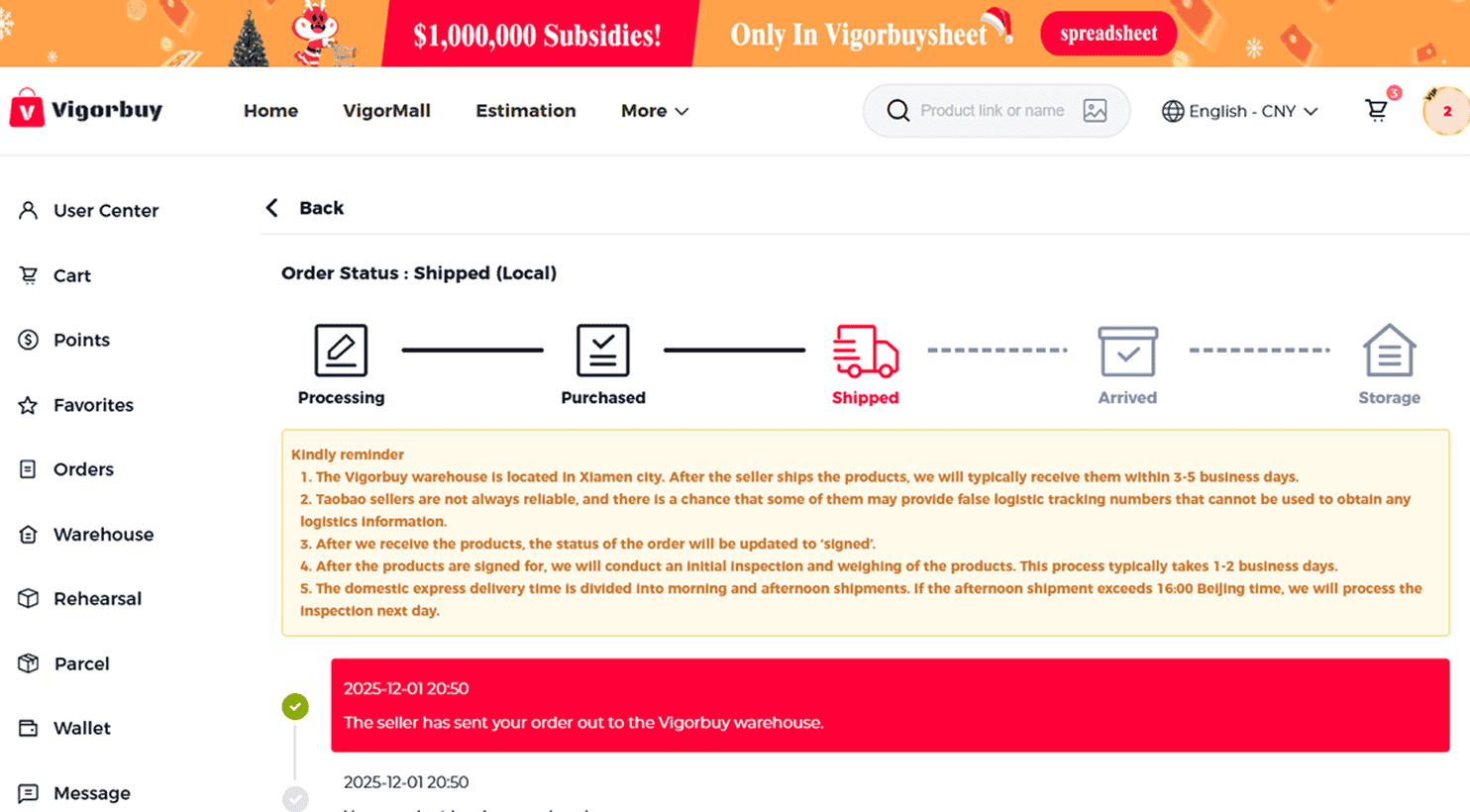
5. Item ships to the Vigorbuy warehouse
Vigorbuy places the order with the seller, who ships it to the warehouse in China. Follow both statuses in Orders. Published warehouse estimates are 3–5 days for Taobao and 1688, 4–7 for Weidian and 5–10 for other sources. Stock, seller speed and season can change these estimates.
Vigorbuy tutorial screenshot · View original 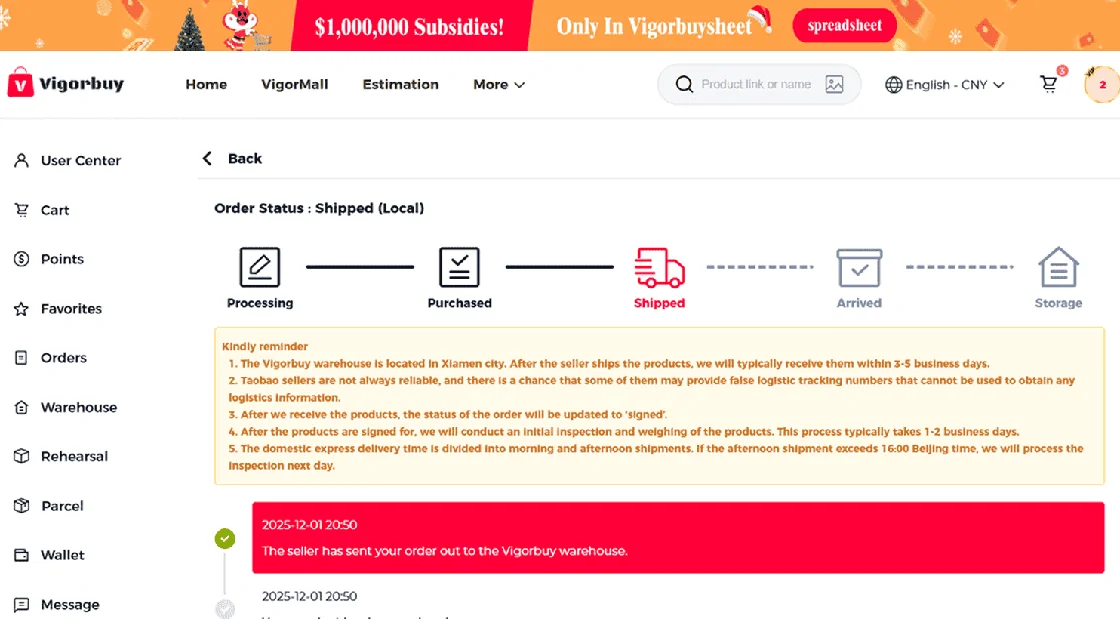
Vigorbuy tutorial screenshot · View original 6. Review QC photos within the window
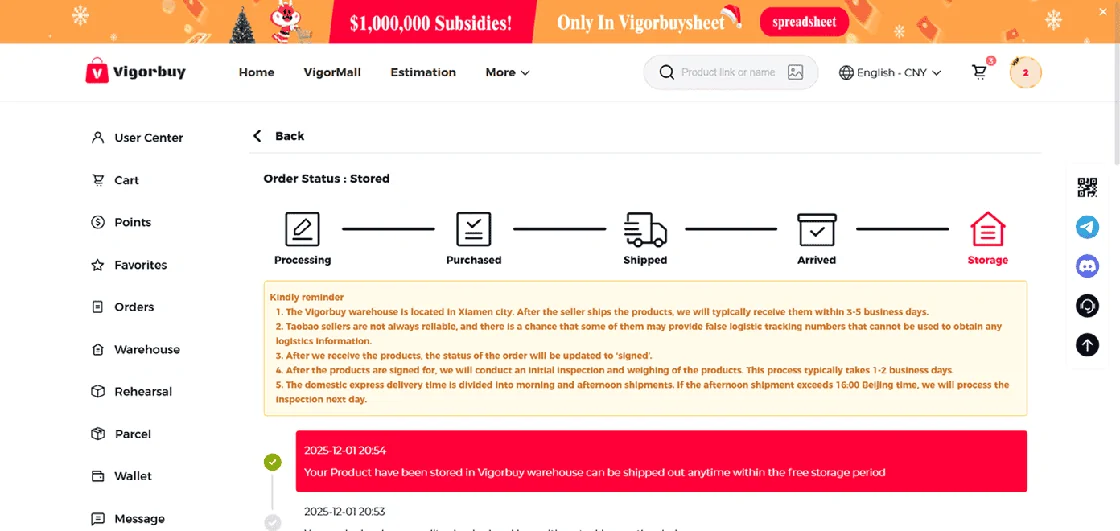
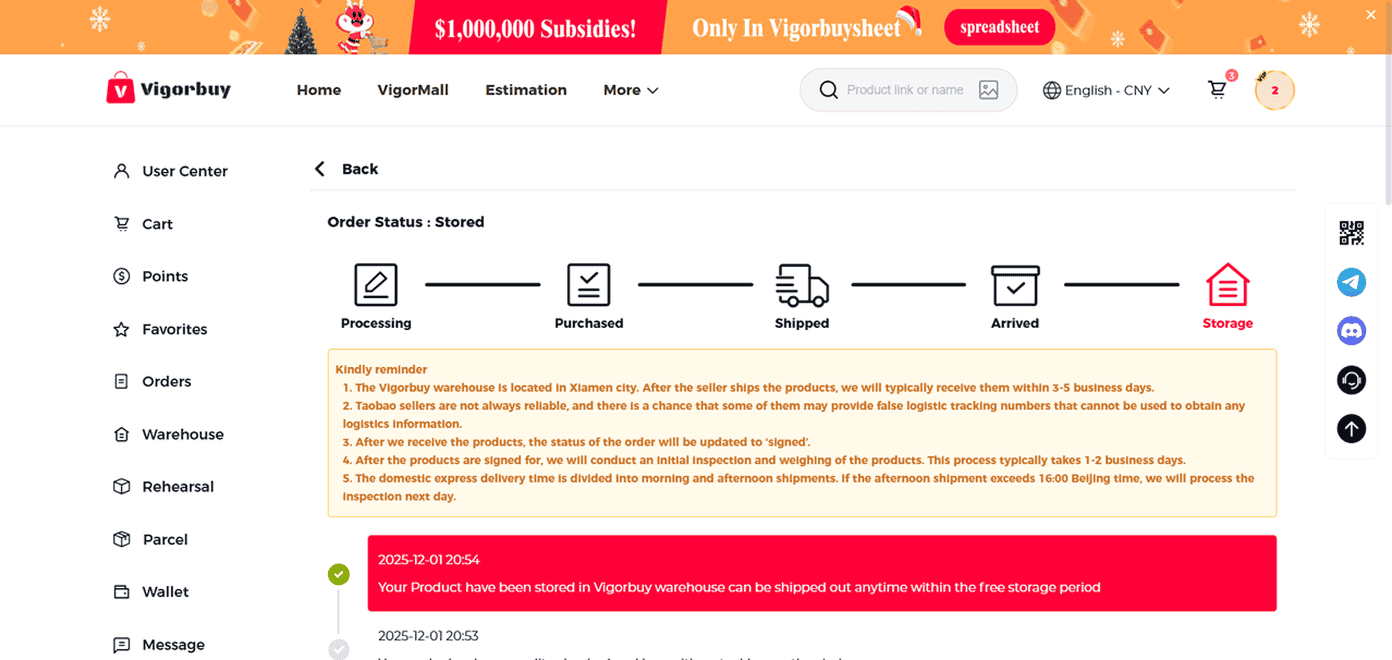
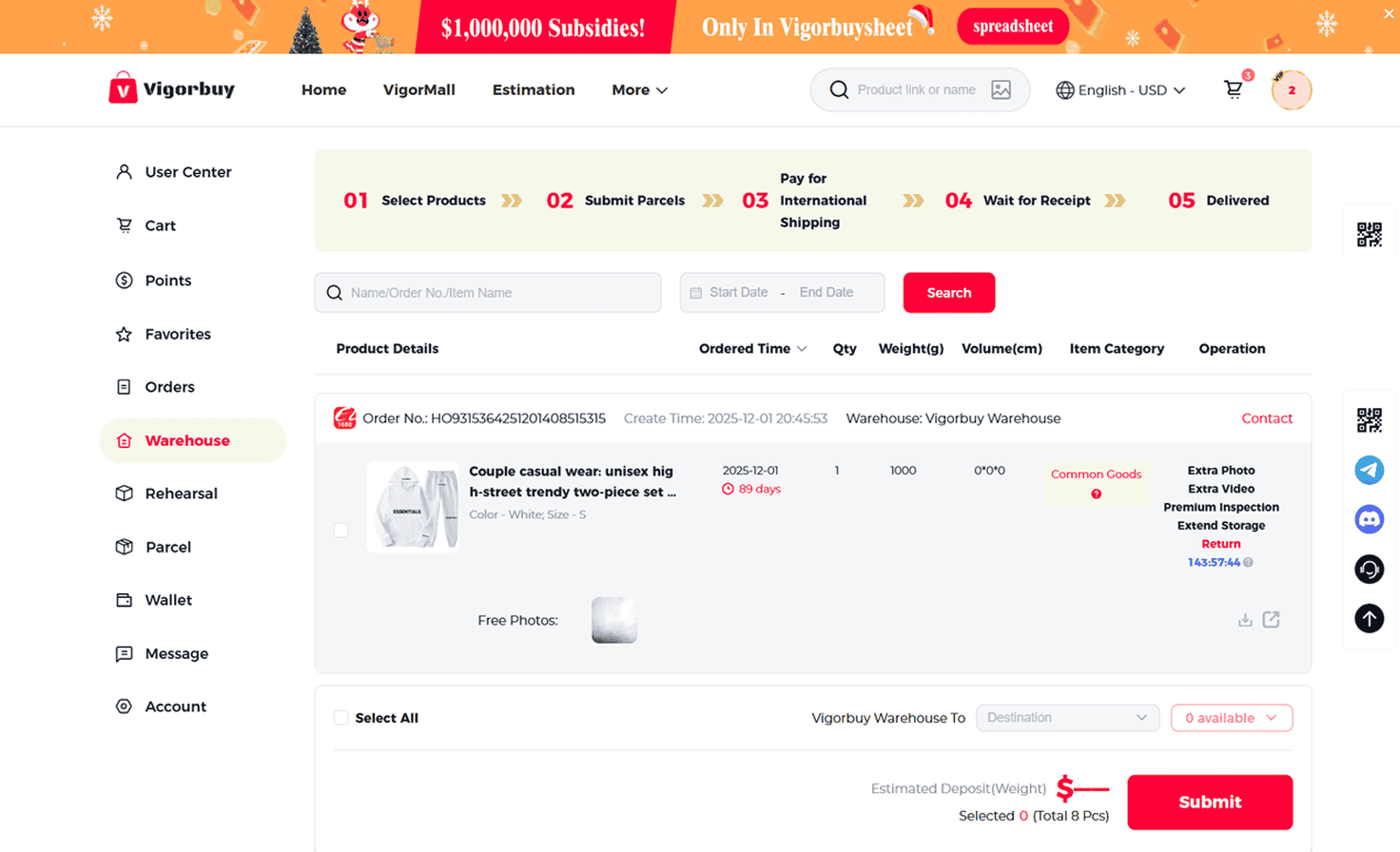
Open Warehouse after the item arrives and look for its QC photos. Check the item, size tag, stitching, logos, damage and completeness. Photos show visible details and help you decide whether to ship. Fit, durability and authenticity require separate checks.
Vigorbuy tutorial screenshot · View original 7. Keep, re-check or return
Keep it. Check the item’s storage deadline. Vigorbuy’s beginner guide describes 90 days of free storage.
Request a re-check. If photos are missing or the result looks wrong, ask for more photos or contact support. The published guidance mentions a free full-set inspection if the standard check exceeds 12 hours and about 24 hours for a disputed re-check.
Ask about a return. Act before submitting the parcel. The previously advertised return-to-wallet window is 72 hours from warehouse receipt. Check the current deadline and eligibility on the order.
Ship and track the parcel
8. Consolidate the parcel
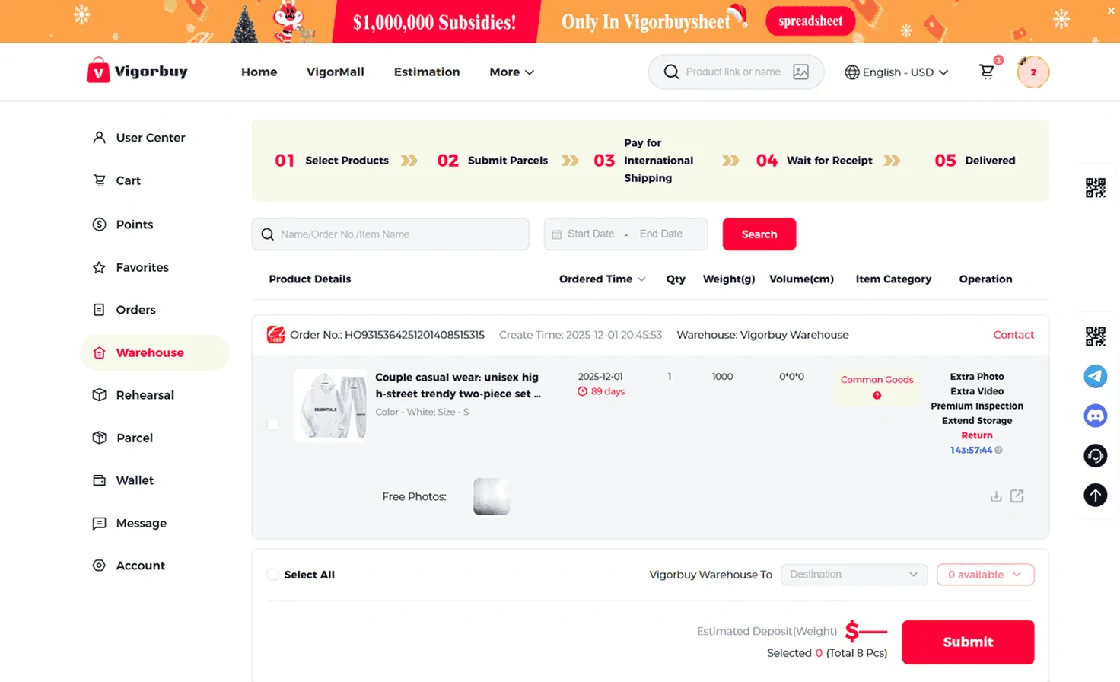
Select the items in Warehouse and submit a parcel request. If you are waiting for related items, compare the cost of one combined parcel with separate shipments. Removing unnecessary packaging can lower the actual or volumetric weight.
Vigorbuy tutorial screenshot · View original 9. Choose a shipping line and pay international postage
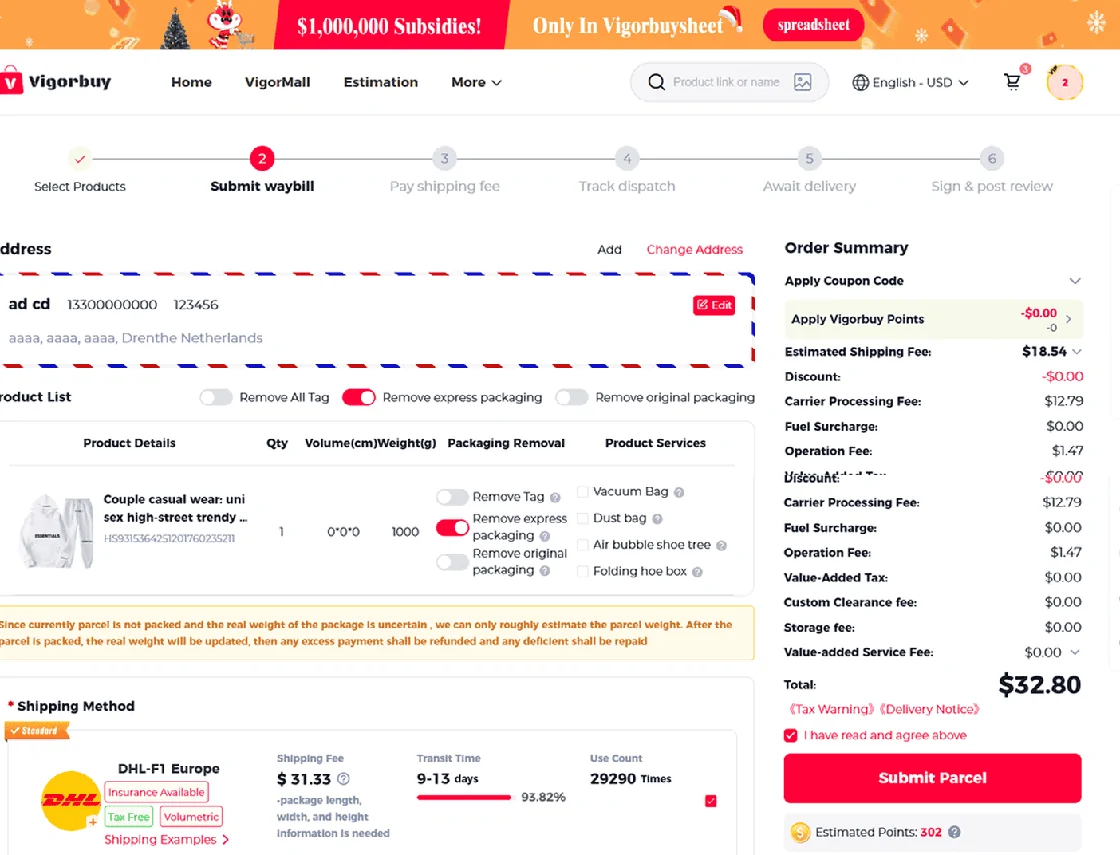
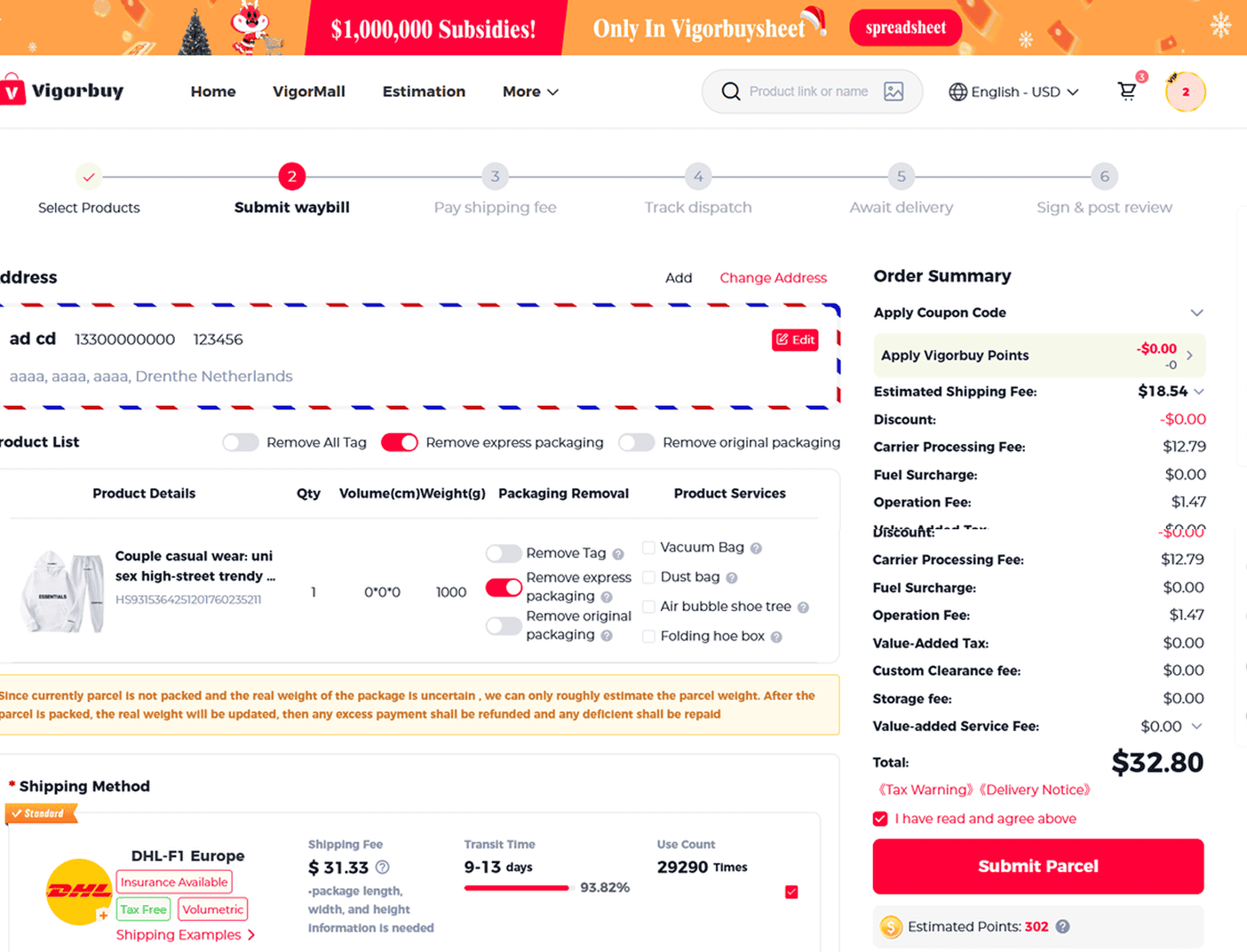
Confirm the delivery address and choose the available line and packing option. Compare the quote, delivery estimate and restrictions for your destination, especially for batteries, liquids or perfume. Pay the second amount for international shipping. Check any adjustment after the final weigh-in.
Vigorbuy tutorial screenshot · View original 10. Track and receive
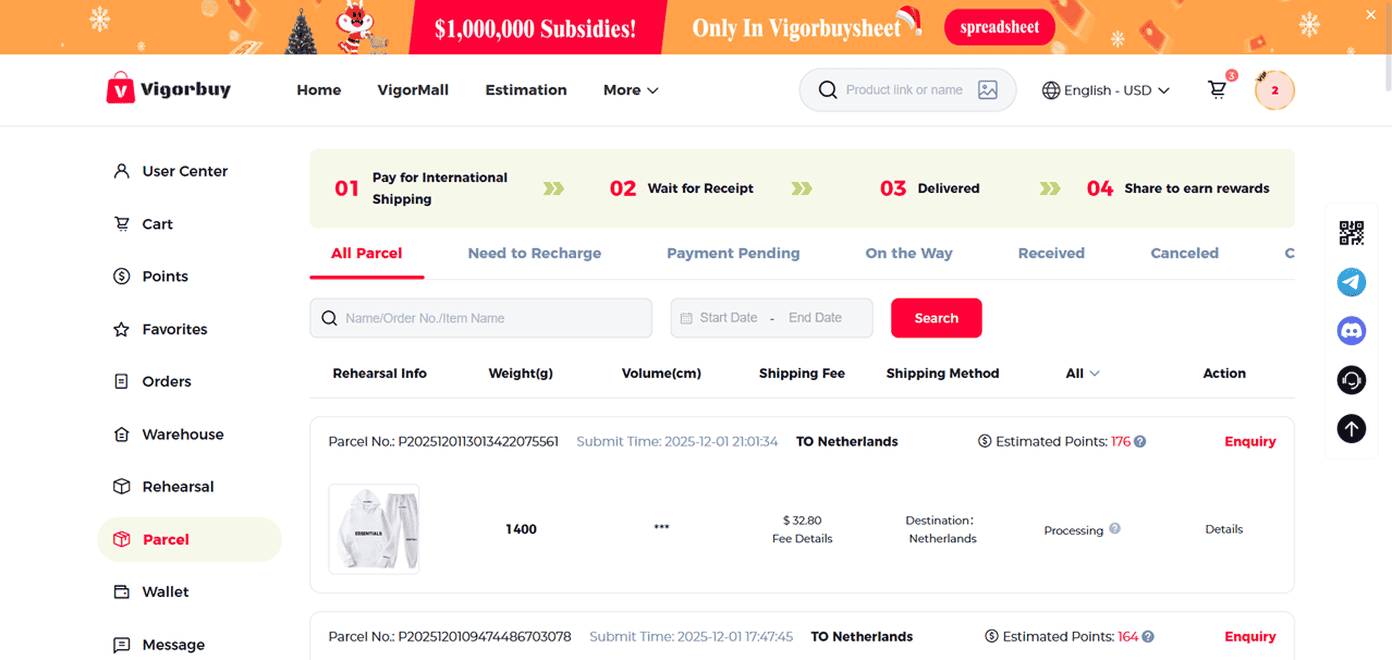
Open Parcels after dispatch to see the tracking number and follow the carrier’s updates. Keep the order and QC records until you receive and check the parcel, in case you need help from support.
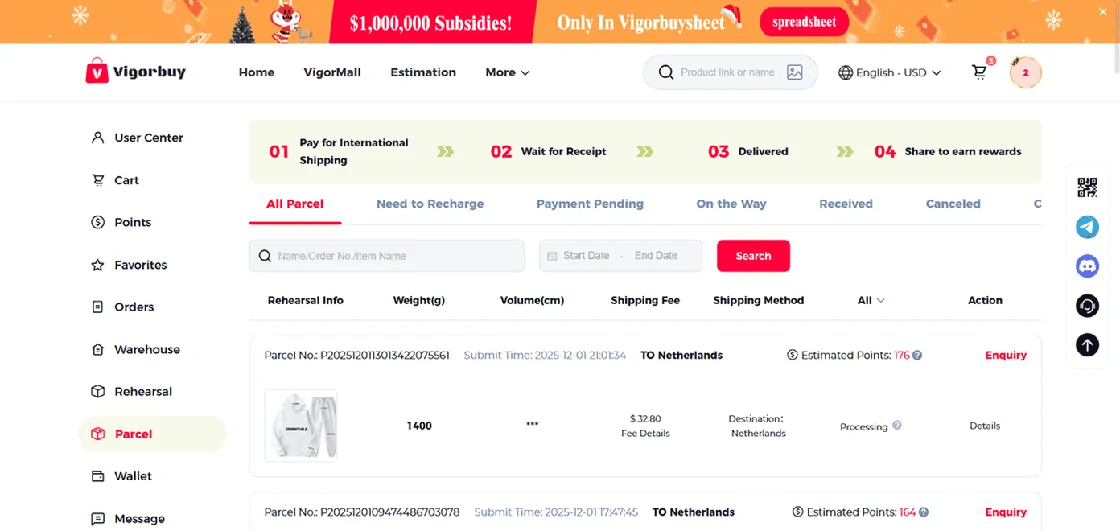
Vigorbuy tutorial screenshot · View original
The two payments, made obvious
The single biggest source of “wait, why is it more?” is expecting one payment. There are two, at two different times:
| Stage | You pay | Roughly covers |
|---|---|---|
| At order | Item + domestic shipping + ~2–4% service fee | Buying the item and getting it to the warehouse |
| At parcel | International shipping. Check separately for applicable import taxes. | Sending the consolidated box to your country |
A small service fee never means a small total. International postage usually decides your final cost; plan for it before you order, not after.
A quick timing estimate you can actually use
To guess a realistic door date, stack three windows instead of hoping for one number:
- Warehouse arrival: 3–7 days for most Taobao/Weidian items.
- QC + your decision: usually same-day to a couple of days, depending on how fast you review.
- International line: express is faster and pricier; economy is slower and cheaper; customs adds variability.
Add them together and pad the total. Never order for a hard deadline; see processing & warehouse time for the full breakdown.
When something doesn’t go to plan
Some variation is normal: stock, seller speed and season all affect it. Check the order status in your dashboard, and message support if it’s well past the range. Advertised windows are estimates, not guarantees.
Raise the issue promptly and check the deadline on your order. If a standard check wasn’t completed in 12 hours you can claim a free full-set inspection; if you dispute a result it’s re-checked within about 24 hours. Before shipping, a for-any-reason return to wallet is advertised within 72 hours of warehouse receipt.
Yes. Order it separately and let both land in your warehouse box, then consolidate them into one shipment. Compare the combined quote with the cost of shipping both parcels separately.
International postage is based on the real weight and volume of the whole parcel, your destination and the line you pick. Vigorbuy advertises refunding overpayment after the real weigh-in.
Step one, in one click
The flow starts on a product page. Pick a category and you are already at step one.
From a category card to the Vigorbuy checkout
The finds pages on this site now cover the first stage for you. Every category shelf shows its picks as photo cards, and each card opens a product page here on vigorbuyfinds.com. Below is the exact click path, with what to verify at each stop.
What a card tells you before you click
Open a shelf such as sneakers or hoodies. On each card you get the item photo, the title as the seller lists it, and the price in ¥ from our 2026-11-18 listing check. Popular picks carry a flag, which helps when two similar items compete for the same slot in your haul. Nothing is bought at this stage; use the cards to shortlist.
What to verify on the product page
Clicking a card lands you on that item's detail page, still on this site. Spend half a minute there: confirm the size and colour options include yours, read the stock count per option, note the listed weight where the seller gives one, and count the QC photos already on file. One sneaker example: the Supreme x Nike Air Force 1 Low White lists at ¥230 (2026-11-18 price) across 14 sizes, with 5 QC photos to study before you commit a single yuan.
The order button, then tracking
Press the Vigorbuy order button and the item opens with the agent. Stock and the live price are confirmed at Vigorbuy's checkout, so treat our ¥ figure as a dated snapshot rather than a quote. From there the stages above take over: pay the item plus the ~2–4% service fee, allow the 3–7 day warehouse window, review QC, consolidate, then pay international shipping. Your tracking number appears after dispatch, so searching for it earlier only burns time. If you would rather route the same item through a different agent, a More agents button sits beside the order button on every detail page.
Estimating shipping before you order
The weight shown on the product page is the figure you need for a rough shipping estimate. Feed it into the shipping estimate on Vigorbuy, with your destination country set, before buying, and read shipping lines explained to pick between express and economy. Heavier categories such as jackets move the total far more than the service fee does.